Tesla P40 LLM Value
A practical total-cost and performance look at used Tesla P40s versus newer 24GB and 32GB GPUs for local LLM inference.
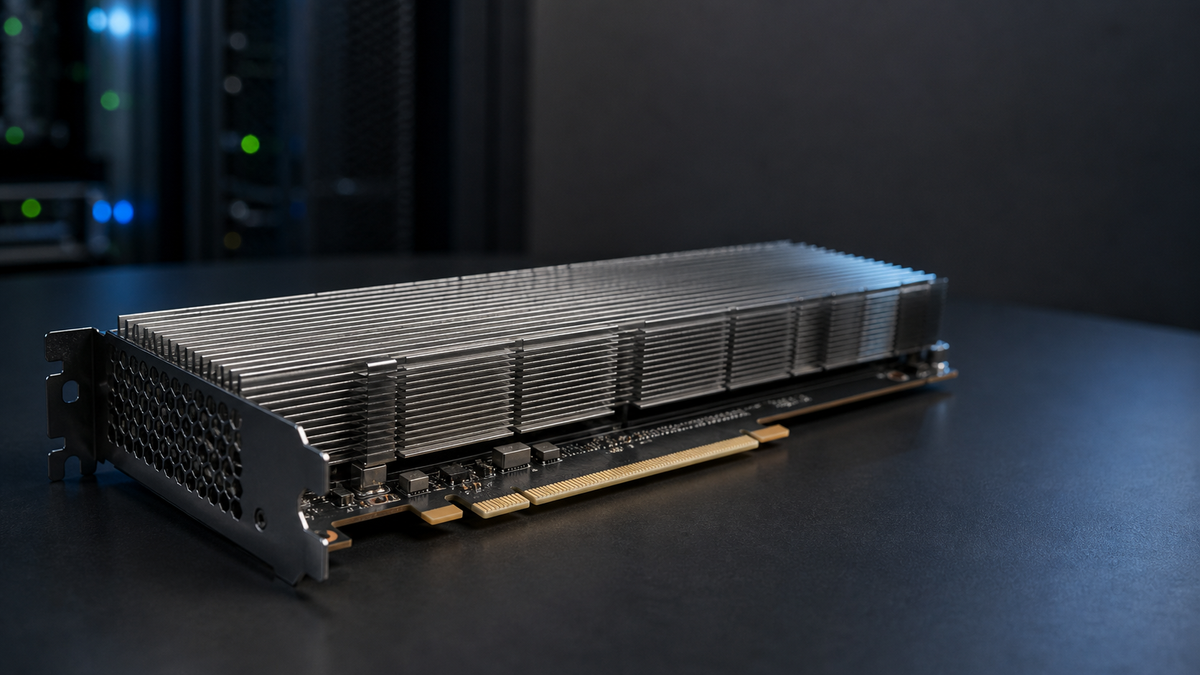
I wanted to test a tempting homelab thesis: if a used NVIDIA Tesla P40 can be bought for a few hundred dollars, does its 24GB of VRAM make it a better all-in value for local LLM inference than newer, much more expensive GPUs?
The useful answer is more nuanced than the purchase price suggests: the P40 is a cheap way to buy 24GB of addressable VRAM, but it is not the best value once performance, power, cooling, and software friction matter.
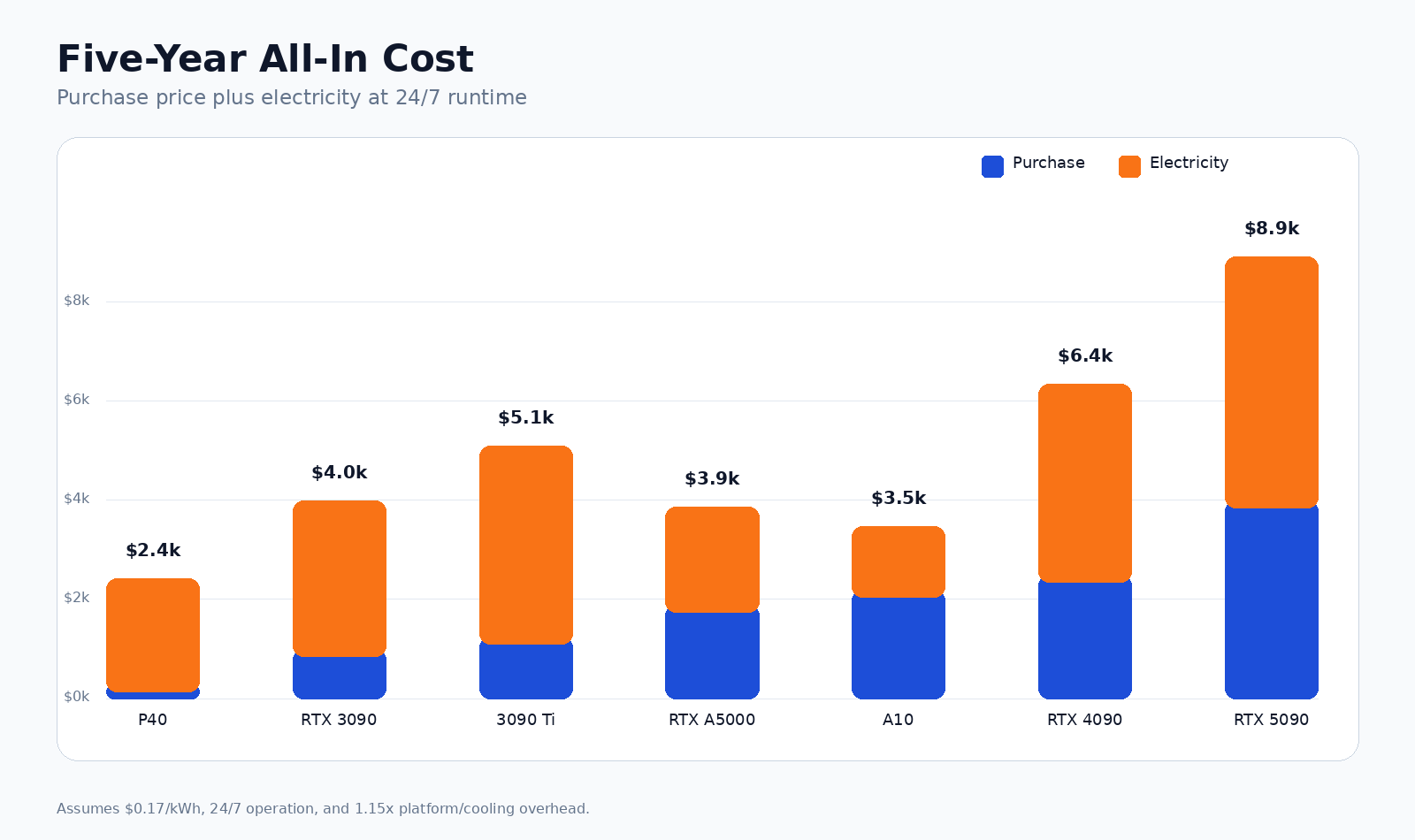
The model combines purchase price, electricity, memory bandwidth, FP32 compute, power draw, and derived LLM-oriented proxies over 2-, 4-, and 5-year running periods. The default assumptions are:
- Electricity at $0.17/kWh
- Continuous 24/7 runtime
- 1.15x platform and cooling power overhead
- Used/current-market GPU asking prices sampled from public eBay-indexed listings on June 23, 2026
The comparison set is the Tesla P40, RTX 3090, RTX 3090 Ti, RTX 4090, RTX 5090, RTX A5000, and NVIDIA A10.
The Headline
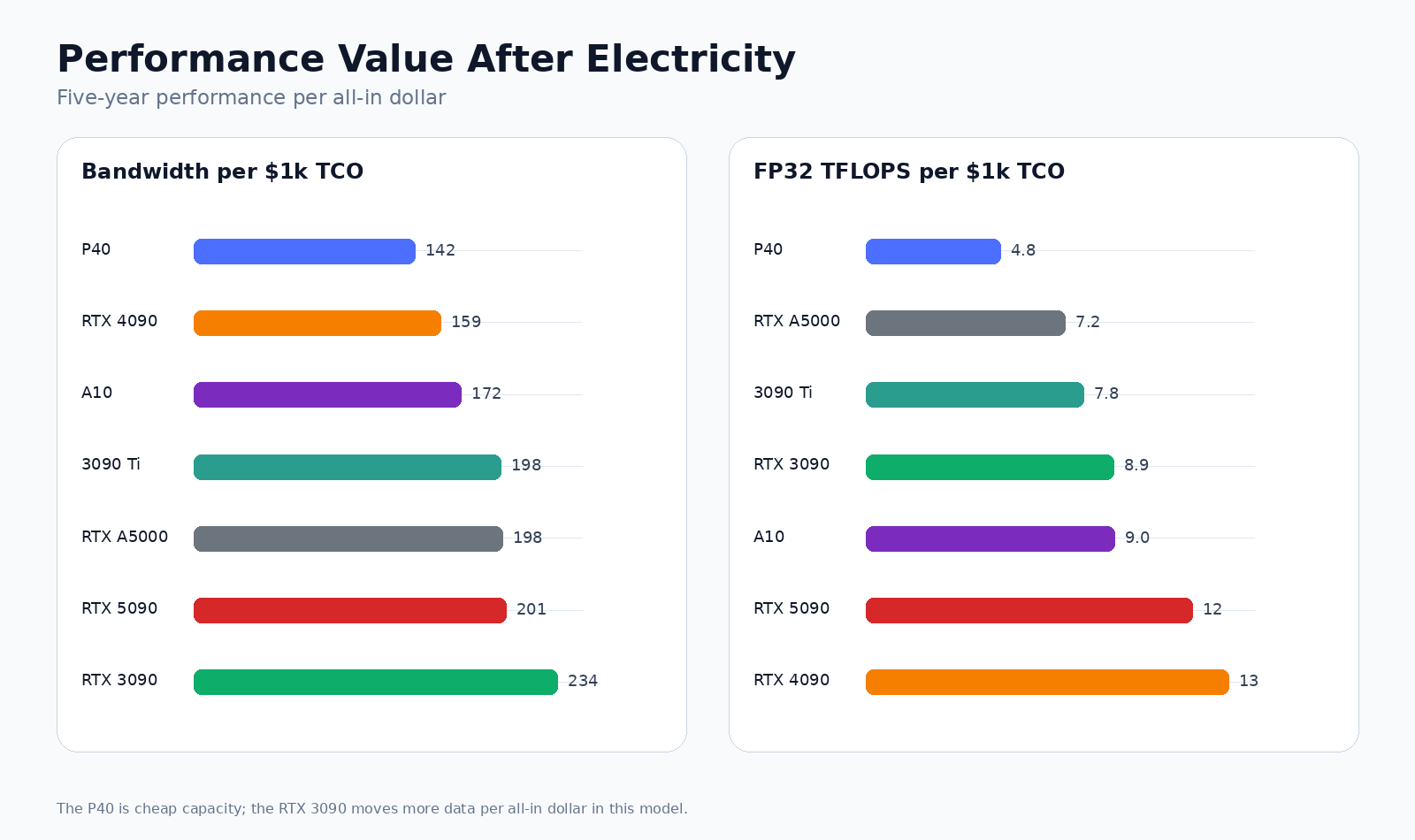
The P40 wins on one metric: cheapest 24GB of VRAM. That is real, and for some experiments it is enough. But the RTX 3090 is the better practical budget inference card because it has much higher memory bandwidth, Tensor Cores, better software compatibility, and stronger performance per all-in dollar.
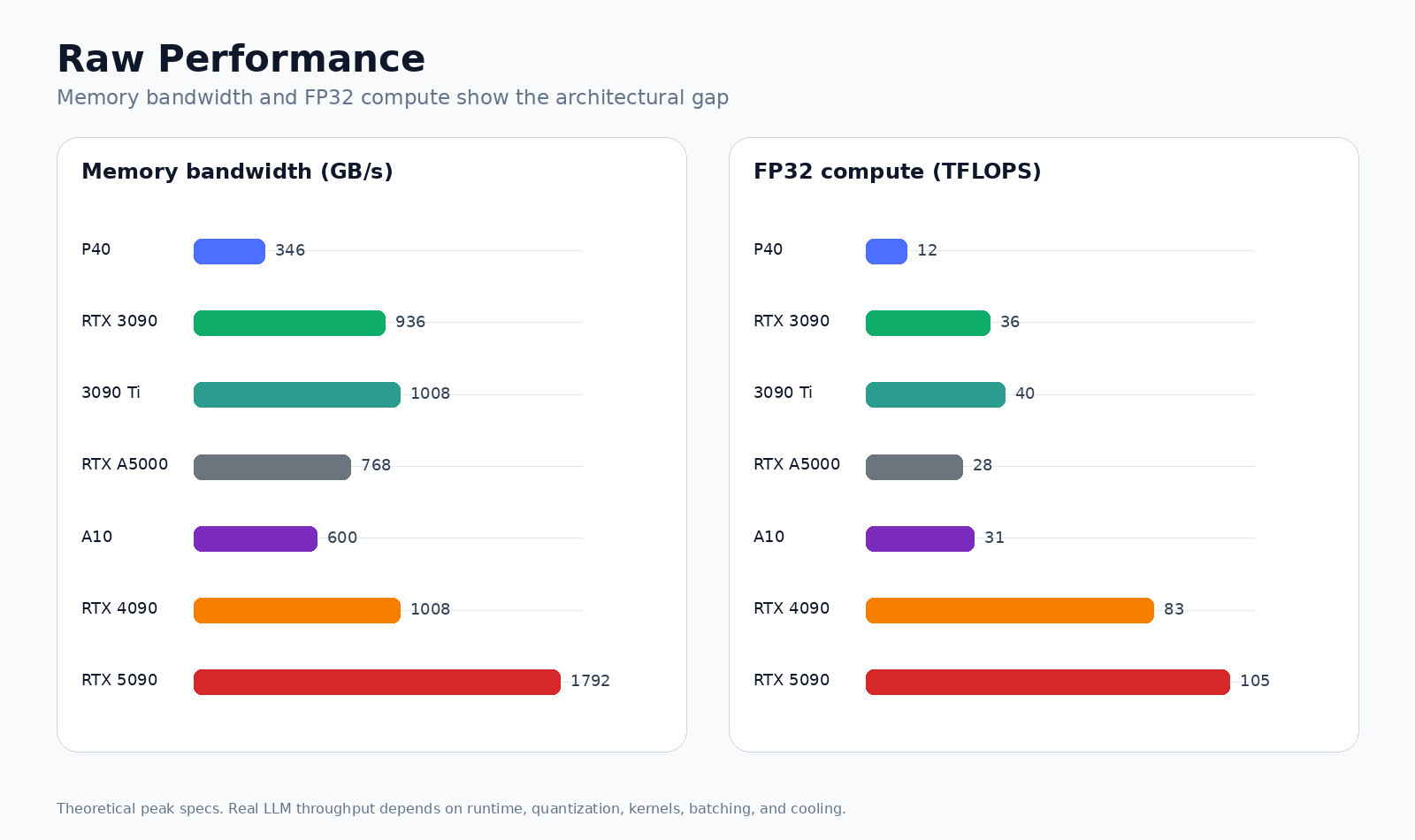
- P40: 24GB VRAM, 345.6 GB/s bandwidth, 11.8 FP32 TFLOPS, 250W TDP, no Tensor Cores.
- RTX 3090: 24GB VRAM, 936.2 GB/s bandwidth, 35.7 FP32 TFLOPS, 350W TDP, modern Tensor Core support.
- RTX 5090: 32GB VRAM, 1,792 GB/s bandwidth, 104.9 FP32 TFLOPS, but current market pricing makes the value story much harder.
Performance, Not Just TCO
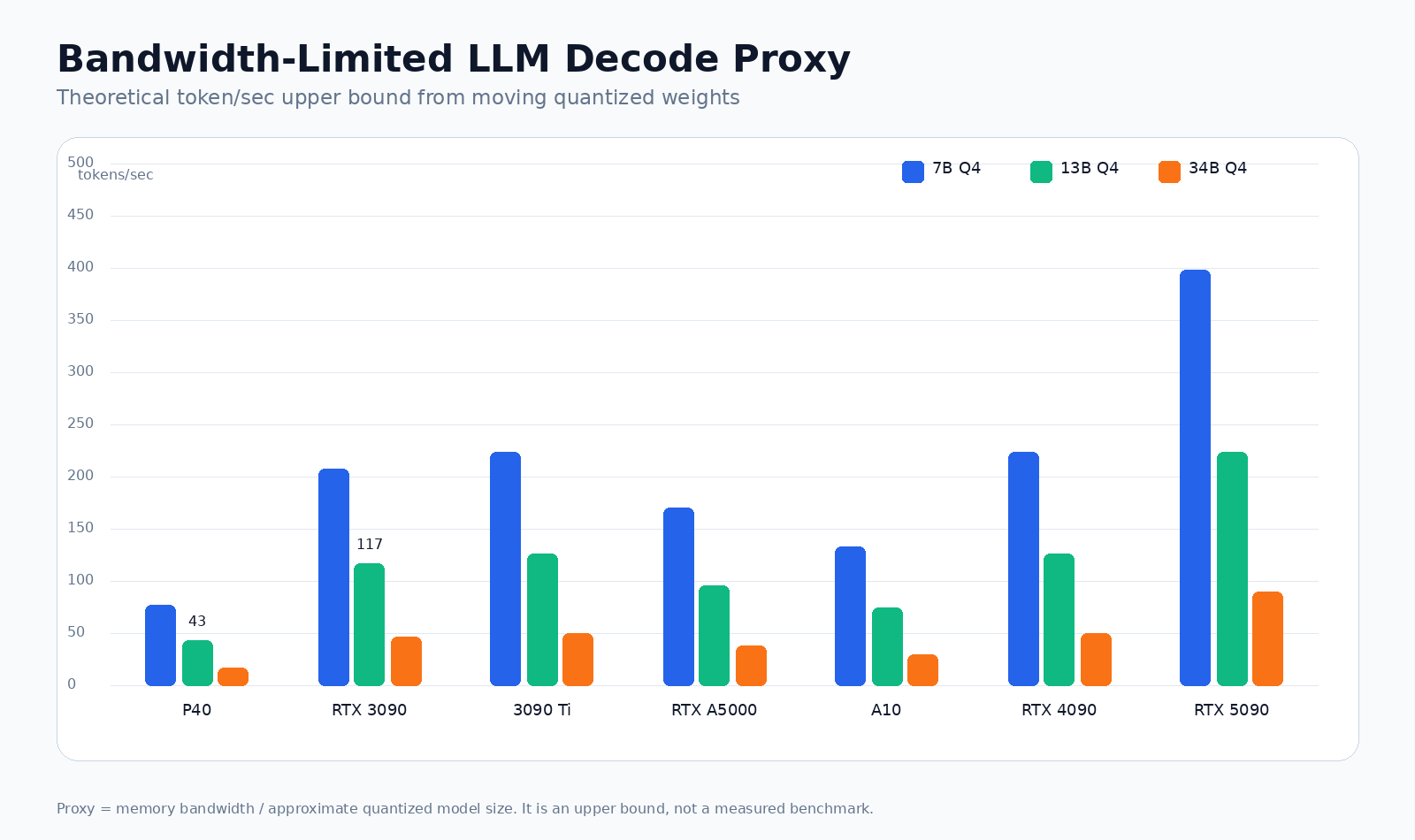
For LLM inference, especially single-user token-by-token decoding, raw FP32 FLOPS per dollar is not the whole story. Decode often behaves like a memory-bandwidth problem: each generated token requires repeatedly moving model weights through the GPU. Capacity determines what fits; bandwidth strongly influences how fast it can run.
Here is the five-year performance table using the same cost assumptions as the TCO model:
| GPU | VRAM | Bandwidth | FP32 | TDP | 13B Q4 Proxy | 5yr TCO | BW/$ vs P40 |
|---|---|---|---|---|---|---|---|
| Tesla P40 | 24GB | 346 GB/s | 11.8 TFLOPS | 250W | 43 tok/s | $2,431 | 1.00x |
| RTX 3090 | 24GB | 936 GB/s | 35.7 TFLOPS | 350W | 117 tok/s | $3,997 | 1.65x |
| RTX 3090 Ti | 24GB | 1,008 GB/s | 40.0 TFLOPS | 450W | 126 tok/s | $5,103 | 1.39x |
| RTX A5000 | 24GB | 768 GB/s | 27.8 TFLOPS | 230W | 96 tok/s | $3,869 | 1.40x |
| NVIDIA A10 | 24GB | 600 GB/s | 31.2 TFLOPS | 150W | 75 tok/s | $3,484 | 1.21x |
| RTX 4090 | 24GB | 1,008 GB/s | 83.0 TFLOPS | 450W | 126 tok/s | $6,353 | 1.12x |
| RTX 5090 | 32GB | 1,792 GB/s | 104.9 TFLOPS | 575W | 224 tok/s | $8,924 | 1.41x |
The “13B Q4 Proxy” is a deliberately simple upper bound: memory bandwidth divided by an approximate 8GB quantized model size. It is not a measured benchmark. Real tokens/sec will be lower because kernels, KV cache, quantization format, CPU overhead, batching, thermals, and runtime choices all matter. But the proxy is useful because it makes the relative memory-bandwidth gap visible.
The Decode Proxy
The P40 can fit many useful quantized models, but fitting a model and serving it quickly are different claims. If we treat memory bandwidth as the first-order decode limit, the RTX 3090 is roughly 2.7x the P40 on raw bandwidth and about 1.65x the P40 on five-year bandwidth per all-in dollar.
What Fits
A 24GB card is comfortable for 7B and 13B quantized models, and can often run 30B to 34B class quantized models with careful context and runtime choices. It is generally not enough for a 70B Q4 model on a single card once overhead and KV cache are included. The RTX 5090's 32GB gives more headroom, but it still does not turn into a simple single-GPU 70B solution for every setup.
That is why the P40 is attractive: it gets you into the 24GB class cheaply. The problem is that the rest of the card is old.
Why The P40 Looks Better Than It Feels
The P40's headline appeal is obvious:
- 24GB VRAM
- Very low used purchase price
- Enough memory for many quantized local models
- Datacenter-card availability in the used market
But the drawbacks are not cosmetic:
- No Tensor Cores
- Old Pascal architecture
- Legacy CUDA compute capability 6.1
- Passive cooling that needs server airflow or a custom fan shroud
- Much lower memory bandwidth than newer 24GB cards
- More friction with modern inference stacks and kernels
- Lower performance for prompt prefill, batching, and higher-concurrency serving
In practice, the P40 is less a cheap 4090 alternative and more a large-memory budget experiment card.
The Best Budget 24GB Card
The RTX 3090 is the uncomfortable middle ground that makes the most sense. It is not cheap in absolute terms, and used high-power consumer GPUs carry real risk. But it has the right mix for local inference: 24GB VRAM, high memory bandwidth, Tensor Cores, broad software support, and a normal workstation build path.
The RTX 3090 Ti is faster on paper but usually worse on value because it uses more power for the same 24GB of VRAM. The RTX A5000 and A10 are operationally cleaner in some workstation/server contexts, but they tend to be too expensive unless the form factor, ECC, lower power, or datacenter features matter. The RTX 4090 and 5090 are performance cards first; their economics only work when latency or throughput is worth the premium.
Where The P40 Still Makes Sense
The P40 can still be rational in a few cases:
- You need the lowest-cost way to get 24GB of VRAM.
- You are running low-QPS, latency-insensitive inference.
- You already have a server chassis with enough airflow.
- You are comfortable debugging older CUDA and runtime compatibility issues.
- You value capacity more than tokens/sec.
- You are building a cheap multi-GPU memory pool for experiments, not production.
It does not make sense if you are trying to optimize for power efficiency, setup time, modern kernels, resale value, or reliable throughput.
Buying Risk
The used GPU market is messy, especially for high-end RTX cards. Recent RTX 4090 and RTX 5090 listings have meaningful scam risk: fake cards, stripped cards, suspiciously cheap listings, and return fraud.
For any expensive card, I would avoid the absolute cheapest listing and favor long seller history, clear photos of the exact card, visible serial numbers where appropriate, proof of function, a real return window, and no vague condition language.
The P40 market has less headline scam risk than 4090/5090 listings, but it has its own problem: many cards are old datacenter pulls with unknown hours, dust, thermal history, and cooling assumptions.
Conclusion
The P40 thesis is directionally right but easy to overstate.
Yes, the P40 is one of the cheapest ways to buy 24GB of VRAM. If that is the constraint, it can be a good homelab part.
No, it does not become a better all-in LLM inference GPU than newer cards just because the purchase price is low. Once you include electricity, memory bandwidth, software support, cooling, and the value of your time, a used RTX 3090 is usually the stronger practical choice.
Buy P40s for cheap capacity experiments. Buy RTX 3090s for serious budget local inference. Buy RTX 4090/5090 only when throughput or latency is worth paying for.
Appendix: Reddit Field Reports
These are not controlled benchmarks. They are field reports from LocalLLaMA users, sorted by date, and they line up with the model above: P40s are useful cheap VRAM, but the practical experience is bounded by old Pascal behavior, cooling, and software support.
Overall Sentiment
- Works best with GGUF, llama.cpp, and KoboldCPP. Multiple users report useful results there, including multi-GPU row splitting and mixed-card offload.
- ExLlama and newer CUDA-heavy stacks are where the pain shows up. Several users call out poor ExLlama behavior or Pascal-specific limitations.
- Cooling and power cabling are recurring gotchas. Users repeatedly mention server airflow, ducting, risers, and the CPU-style 8-pin power connector.
- The 3090 remains the smoother recommendation when budget allows. The P40 wins on cheap capacity; the 3090 usually wins on speed, compatibility, and time saved.
Chronological Notes
2023-05-07: One early report claimed usable 13B and 30B speeds on a P40 in 4-bit.
"I have a P40 and I get 16 tokens per second on 13B models and 10 tokens/s on 30B models in 4 bit."
Source: LocalLLaMA comment by harrro.
2023-05-08: A hardware-focused warning emphasized that these are datacenter cards, not desktop cards.
"Cooling. Like really, these things are 350w space heaters designed to have high power delta fans blowing air at high pressure through them."
Source: LocalLLaMA comment by ElectroFried.
2023-05-12: A user comparing a P40 with a 3090 framed the P40 as slower but viable, and warned not to expect NVLink to magically combine cards into one large GPU.
"The 3090 is about 1.5x as fast as a P40. So IMO you buy either 2xP40 or 2x3090 and call it a day."
Source: LocalLLaMA comment by a_beautiful_rhind.
2023-05-22: One user liked the price, but said setup friction was materially worse than with a consumer GPU.
"I recently got the p40. Its a great deal for new/refurbished but I seriously underestimated the difficulty of using vs a newer consumer gpu."
Source: LocalLLaMA comment by frozen_tuna.
2023-06-09: Another user summarized the value case cleanly: old datacenter cards are awkward, but they open up bigger models cheaply.
"I bought a P40 ... for about $200 a few weeks ago. ... Sure, they're big, power-hungry, slower than more recent cards, and require some sort of cobbled-together cooling solution, but they're a cheap way to get into bigger models."
Source: LocalLLaMA comment by candre23.
2023-06-29: The common software caveat shows up strongly around ExLlama and bitsandbytes.
"P40 can't use newer bitsandbyes. Exllama does not run well on it, I get less than 1t/s. AutoGPTQ works fine but it's still rather slow to inference."
Source: LocalLLaMA comment by CasimirsBlake.
2023-07-05: A dual-P40 homebuilt rig could run 65B-class models, but the owner described the result as just barely comfortable.
"Total out of pocket cost was less than one used 3090. Performance is... actually pretty slow. But I can run 65b models at a borderline-usable 2-3t/s."
Source: LocalLLaMA comment by candre23.
2023-07-20: A P40 running Llama-2-13B-chat GPTQ through oobabooga/AutoGPTQ posted repeated outputs around 12 tokens/sec.
"Output generated in 6.31 seconds (12.04 tokens/s, 76 tokens...) ... Output generated in 16.06 seconds (12.39 tokens/s, 199 tokens...)."
Source: LocalLLaMA comment by Gord_W.
2023-07-23: Another report put 30B Q4 generation at roughly 7-8 tokens/sec in KoboldCPP/llama.cpp.
"Koboldcpp (and by extension llama.cpp) work well with the P40. I'm getting between 7-8 t/s for 30B models with 4096 context size and Q4."
Source: LocalLLaMA comment by xontinuity.
2023-07-24: A mixed 2xP40 + 1x3090 user explained why the P40 is awkward in modern inference paths: its FP16 behavior is poor even though it has plenty of VRAM.
"P40 cards are really bad at fp16 calculations, to the point upscaling calcs to fp32 runs faster."
Source: LocalLLaMA comment by dragonfyre13.
2024-03-25: A later report from a 2xP40 owner keeps the same theme: best value if the cooling hassle is acceptable.
"P40 is the most bang for the buck, for inference only, if you're not bothered by awkward cooling solutions."
The same user reported P40 performance similar to a 4060 Ti 16GB in llama.cpp for 7B quantized models, around 40 tokens/sec. Source: LocalLLaMA comment by Woof9000.
2024-06-02: A mixed older-card machine, with 2x P40 and 2x P4, reported practical 70B-class inference.
"This machine and its 64gb of vram gets me 7 tokens/second and great prompt ingestion time with llama3-instruct-70b with GGUF, q4_k_m quantization. I can get 10 tokens/second with Miqu, q4_k_m."
Source: LocalLLaMA comment by Antique_Juggernaut_7.
2024-06-07: A dedicated benchmark post tested Command-R GGUF quantizations on 2x P40s with llama.cpp, flash attention, and KV quantization.
"System runs 2x P40s with a 187W power cap. If you are interested in the effects of the power cap, it has essentially zero effect on processing or generation speed."
The base Q4_K_M run reported 8.60 tokens/sec generation, while one flash-attention comparison reported 12.97 tokens/sec generation. Source: LocalLLaMA benchmark post by Eisenstein.
2025-01-28: P40 owners were still using them for very large, partially offloaded experiments. One user tested a 1.58-bit DeepSeek R1 dynamic GGUF using 2x P40s plus 128GB of system RAM.
"Using koboldcpp + 2 P40's and 128 gb of system ram. ... GPU1 23,733mb used. GPU2 23,239mb used."
Source: LocalLLaMA comment by Slaghton.
2025-03-03: A user reported a mixed P40 + RTX 3090 setup for full offload of 70B-class 4-bit models.
"I run a Tesla P40 and an RTX 3090 to fully offload 4bit 70b models."
Source: LocalLLaMA comment by Organic-Thought8662.
2025-04-12: A Windows/KoboldCPP user reported that the P40 still worked for LLMs in TCC mode, while leaving Stable Diffusion to a 3090 because of Pascal's weak FP16 behavior.
"For LLMs, i'm using KoboldCPP (which is a llama.cpp derivative) and it works in TCC mode perfectly. ... FlashAttention works out of the box with KoboldCPP too (even on my ancient P40)."
Source: LocalLLaMA comment by Organic-Thought8662.
Recent Follow-Up: April-May 2025
After the first pass, I looked specifically for newer LocalLLaMA P40 chatter. I found a concentrated April-May 2025 burst, but no clear public-archive hits from June 2025 through June 2026. That does not prove nobody discussed P40s after that, because Reddit search and archival access are incomplete, but it does suggest the public conversation I could verify was clustered around the spring 2025 multi-GPU and Pascal-support discussions.
2025-04-15: A quad-P40 user reported that inference power draw can be materially below the card's stock TDP when power-limited and spread across multiple cards.
"on my quad P40 system I have the cards limited to 180W each (stock they are 250W). When running Llama 3.3 70B with -sm row (tensor parallel), the maximum I have seen from each card is ~130W."
Source: LocalLLaMA comment by FullstackSensei.
2025-04-19: A Llama 4 Maverick speed-test thread compared a 10x P40 llama.cpp setup against large RTX 3090 and CPU-assisted configurations.
"llama.cpp 10x P40's - Q3.5 full offload 15 T/s at 3k context. Prompt 162 T/s."
The same test listed 16x RTX 3090s at 36 T/s and 781 T/s prompt, which keeps the same theme: the P40 build can work at scale, but newer cards remain far faster. Source: LocalLLaMA post by Conscious_Cut_6144.
2025-04-25: One user summarized the modern software split: P40s are still viable in llama.cpp/Ollama paths, while 3090-class cards are where broader inference-tool support begins to matter.
"3090's is where you get support for most inference tools (like VLLM). Pascal (P40) is still supported in llama.cpp/ollama."
Source: LocalLLaMA comment by Conscious_Cut_6144.
2025-04-26: Another user made the price-regime point directly: the P40 story looked different when the cards were cheap.
"3090 is best buy for speed affordability but these are cheap options to get all sorts of models working. ... They are way more expensive than they used to be so probably still 3090. Back when they were $200 was a better time."
Source: LocalLLaMA comment by artificial_genius.
2025-05-06: In a thread about NVIDIA dropping CUDA support for older architectures, one P40 owner pushed back against immediate doom while acknowledging the cards are aging.
"When I bought my P40 years ago, folks were discouraging it and I got them for $150 only for folks to now pay $450 for them. We are still 3-4 years away for these to lose their useful life."
Source: LocalLLaMA comment by segmond.
2025-05-10: A multi-GPU user reported that llama.cpp tensor-parallel row splitting can scale on P40s when the PCIe setup is not starved.
"it does work on my quad P40 and triple 3090 rigs. It does give a big boost, ~1.7x for two cards and ~2.3x for 3 cards vs 1 card."
Source: LocalLLaMA comment by FullstackSensei.
2025-05-13: A detailed 18U AI homelab build log showed that P40s were still part of serious hobbyist multi-GPU systems, but only with rack-level mechanical, power, and cooling work.
"I have a total of 10 GPUs acquired over the past 2 years: 5 x Tesla P40, 1 x Tesla P102-100, 2 x RTX 3090 FE, 2 x RTX 3060."
The same build discusses bifurcation, risers, CRPS power supplies, and dedicated fan control, reinforcing that P40 economics often depend on accepting server-style build complexity. Source: LocalLLaMA post by kryptkpr.
2025-05-19: A user comparing Intel Arc Pro B50 economics with older P40s said their very low P40 acquisition price still made replacement unattractive.
"I have four 3090s and 10 P40s. The B60 has 25% more memory bandwidth vs the P40, but I bought the P40s for under $150/card average ... I don't see myself upgrading anytime soon."
Source: LocalLLaMA comment by FullstackSensei.
The newer chatter strengthens the same conclusion rather than changing it. P40s still show up in serious homelab rigs when the owner wants cheap aggregate VRAM and can handle the mechanical/electrical mess. But once P40 prices drift toward $400-$450, the case gets much weaker, and the community keeps pointing back to RTX 3090-class cards for broader software support and better performance per unit of effort.
The community picture is therefore not that P40s are useless. It is that they are highly conditional: good for cheap VRAM and GGUF/llama.cpp-style inference, poor as a modern general-purpose accelerator, and especially unattractive if cooling, driver work, or software compatibility will cost more time than the card saves in money.